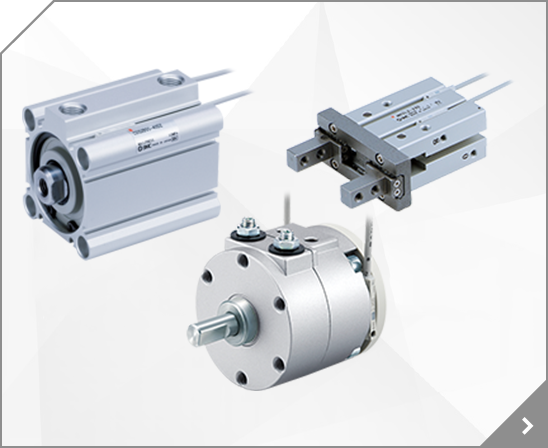
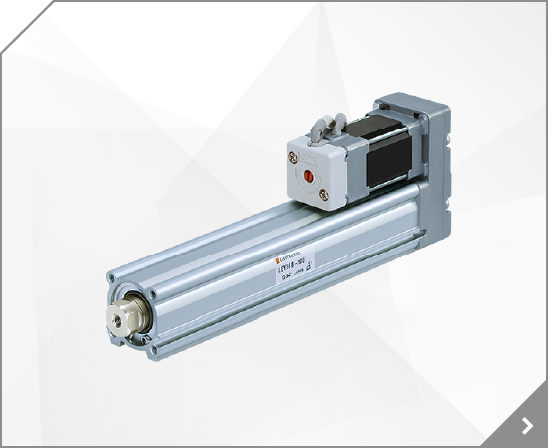


 Smooth Cylinder Series CA2Y ø40, ø50, ø63, ø80, ø100 Specifications and auto switch information not provided below are the same as those of the standard, double acting, single rod type of Series CA2 .
 Dimensions/40 to 100 Basic/CA2YB 4-J 2-P (Rc, NPT, G) MM Width across flats KA G G D E H1 AL B1 K A N F N B C M S + Stroke H ZZ + Stroke (mm) Bore size (mm) 40 50 63 80 100 Stroke range Up to 500 Up to 600 Up to 600 Up to 700 Up to 700 B C A AL B1 D E F G H H1 J K KA M MM N P S ZZ 30 35 35 40 40 27 32 32 37 37 60 70 85 102 116 22 27 27 32 41 44 52 64 78 92 16 20 20 25 30 32 40 40 52 52 10
Applicable model P215420-07 For JT20 7 Dust cover P215432-07 For JT32 P215440-07 For JT40 Dimensions JT20 to 40 M, P D M E F C G A B H Standard Pneumatic: Up to 0.7 MPa [mm] Model Connection thread M A B C D E F G Width across flats H Maximum thread depth P Weight JT20 M8 x 1.25 19.2 8 11 (25.4) 23 10 13.6 22 9.5 22 g JT32 M10 x 1.25 23 10 13.4 (30.6) 28 12 16.3 27 11.5 38 g JT40 M14 x 1.5
20 24 24 130.5 148 171 8 10 12 55 63 74 Port size/Flange: 32F, 40F, 50F J (Valve open) Indicator (Option) Pilot port E 12(P1), 10(P2) Port size: refer to table below P1 P2 H H D B A 32 B C G F 4 x 2 x 18 mounting hole A Applicable flange 1(A), 2(B) Pilot port 12(P1), 10(P2) A B C D E F G H J Model VND50D-32F VND60D-40F VND70D-50F 8 10 12 50 40 32 1 8 1 4 1 4 130 150 180 211.5 227 251 135
Visible Visible Air suction side Filter Filter holder LED Indicators PWR Power supply indicator ION/HV Static neutralization operation/ Incorrect high voltage indicator ALM Error indicator NDL Maintenance indicator 4 Fan Type Ionizer IZF Series Models and Functions New New IZF21 IZF31 IZF10 IZF10R P.11 P.11 P.21 P.21 Size (Depth x Width x Height) (mm) 40 x 104 x 155 40 x 144 x 195 39 x 80
60 77 96 113 46 60 76 85 34 40 50 60 24 36 41 50 135 164.5 200 219 50 60 79 90 77 95.5 111 119 1 2 3-Rc 3 4 3-Rc1 Rc1 4 Rc1 4 Rc1 8 1 2 2-Rc 3 4 2-Rc1 Model J K L M N O P Q R S T U V VNH1 -10A A B VNH2 -15A A B VNH3 -20A A B VNH4 -25A A B M5 x 0.8 depth 5.5 M6 x 1 depth 6 M8 x 1.25 depth 6 M8 x 1.25 depth 6 202.5 232 267 286.5 29 36 48 51 25 30 35 38 30 40 50 56 37 43 50.5 58.5 75 100 126
Dimensions/20 to 40 Basic/CM2YB Width across flats B2 2-P (Port size) (Rc, NPT, G) 2-NN H1 H2 G G Width across flats B1 I 2-Eh8 D MM AL A F F NA 1.5 1.5 N N K H S + Stroke ZZ + Stroke Boss-cut ZZ + Stroke (mm) A AL B1 B2 D E F G H H1 H2 I K MM N NA NN P S ZZ Bore size (mm) 20 25 32 40 0 0.033 0 0.033 0 0.033 0 0.039 18 15.5 13 26 8 13 8 41 5 8 28 5 M8 x 1.25 15 24 M20 x 1.5 1/8 62 116 20
Horizontal 10 10 P.10 Standard motor 6 6 P.18 Vertical 10 10 P.26 Frame-type linear guide LTF 6 6 P.34 Horizontal 10 10 P.42 Non-standard motor 6 6 P.50 Vertical 10 10 P.58 Options P.66 Construction P.67 Mounting P.68 Non-standard Motor Mounting P.69 Deflection Data P.71 Part Number Designations P 1 E F G LTF 6 100 R 2 X10 Motor specification Lead screw lead Series Series 6 Nil
Symbol Applicable stations Mounting position U side D side Both sides M Special specifications 2 to 10 stations 2 to 10 stations 2 to 16 stations D U B Indicate special specifications separately on a manifold specification sheet. Note 2) The number of blanking plate assemblies is also included.
resolution is 1048576 [Pulse/rev] P Travel amount per 1 command pulse [m] n1/n2 Pulley ratio *1 Ex.)
With the P port on the manifold's D side in front, mount the interface regulator so that the position of its pressure gauge is as shown in the figure to the right. 2. When mounting an interface regulator, tighten the bolts with a torque of 0.9Nm. Pressure gauge SMC 1 P 5 3 R2 R1 D side PE Pressure Setting Caution 1.
Body Czc Plasa lkt filtration att6r sutllx number Ex:ulolo.'..7-40 "Not a maximum pressur, .lYhon Bpaciting rnor than orE optbn, Pra3s ijs{ nuzE icrly lhn alprrEb{icatty. Exr 27N-4O (40pm), 2NB '||oL: O.der ol assembly (Erample) OO' NAF + NAFI + iIAL Port Atlachment modl Air entry Port sire Applicable 0 6 % N P T t o I N P T Description Location s MF +NAq +a +M! NAF +6+ NAR NAC50?
VV3Q11 (L5) (L4) (L3) (8.5) 88 L2 48.7 L1 Plug ass'y VVQ100-12A2 3 1 (35) (45) 33 (5.5) 23.5 12.3 E 3 2 R11(Min. bending inner radius) 21.5 Manual override (29.3) 104 D side U side Stations 1 2 3 4 5 n 2-M50.8(E port) 2-M50.8(P port) 42.9 A A (8.5) 20 5 15 (7.5) 5 (A port) n-M50.8 15 P=10 Dimensions n: Stations(Max.18 stations) Equation : L1=10n+32 L2=10n+43 n L 2 52 63 83 112.5 123 3 62
RIr-,rniTIi n"a I /'i\ v ' _ _ + _ (+) Elcrric Surue aboter D-FsBAUD-JsgW Il',A67 D-A64 D-A59W D-FsP, D.F7P, D-F7 PV D-F5PW D-F59, D-F79, O-F7NV t}F5NTL r+r B-6d Oulput @ I o Elack o L D-J51 r @ D-F59W D-F59F D-.J59, D"J79, Drr7gc, D-F7BV r l lf:r_ rlrtlH-r r-rad t l l l o{tsd OUT 1 output b Diagnoslic ouipul OUT D-472.O-472H D-480. D.A8OH fContu*-r box !
RIr-,rniTIi n"a I /'i\ v ' _ _ + _ (+) Elcrric Surue aboter D-FsBAUD-JsgW Il',A67 D-A64 D-A59W D-FsP, D.F7P, D-F7 PV D-F5PW D-F59, D-F79, O-F7NV t}F5NTL r+r B-6d Oulput @ I o Elack o L D-J51 r @ D-F59W D-F59F D-.J59, D"J79, Drr7gc, D-F7BV r l lf:r_ rlrtlH-r r-rad t l l l o{tsd OUT 1 output b Diagnoslic ouipul OUT D-472.O-472H D-480. D.A8OH fContu*-r box !
i d i P P PV)SV SV MV , , ,SEL IDH Series 37 3.10 IDX-OM-W038 3. / 3.10.3 IDH*4-*** IDH*6-*** SV 25.0 25.0 AT oFF oFF oFF / P 5.0 9.0 :% I 60 70 : D 11.5 13.5 : LoC oFF oFF oFF A1TP 10 10 AL1 5 5 A1HY 1 1 DLY1 20 20 : 3.10.4 LoC (028) oFF () ALL PARA SV [] .
Actuator operation from host . 40 8.1 CiA 402 drive profile . 40 8.1.1 FSA state . 40 8.1.2 Controlword / Statusword . 41 8.1.3 Control mode . 42 8.2 Parameter setting . 43 8.3 Servo-on and Homing . 44 8.4 Positioning operation (Profile position mode) . 45 9.
Auto switch internal circuit Weight Unit: (g) D-F8N D-F8N D-F8P D-F8B Auto switch part No.
D -With Built in Magnet (Not available as std. on single acting models, XB6 & XB7) I XBg -Low Friction I XCO -Stainless Steel Rod LNumber of Auto-swircnes -2 pcs. S 1 p c . n n p c s . L Long leads uountng B Front Nose Mount C -Rear Pivot E -Double End K -Non-Rotating Rod R -Block Mount W-Double Rod Auto.Switch 853. D-853 Gsg D-G59 B54. D-854 K59 D-K59 864 .
Printed in Japan. 1st printing May, 2000 D-SMC.L.A. P-80 (D)
Select "P-1". U UP P D DO OW WN N b. When the "UP" and "DOWN" buttons on the driver operation are pressed, the display will be shifted as shown below, Select "P-3" and press the "SET" button. Point table No.1 No.2 No.3 No.4 No.5 No.6 No.7 c. The "UP" and "DOWN" buttons on the driver operation are pressed to Select "Spd", thenpress the "SET" button.