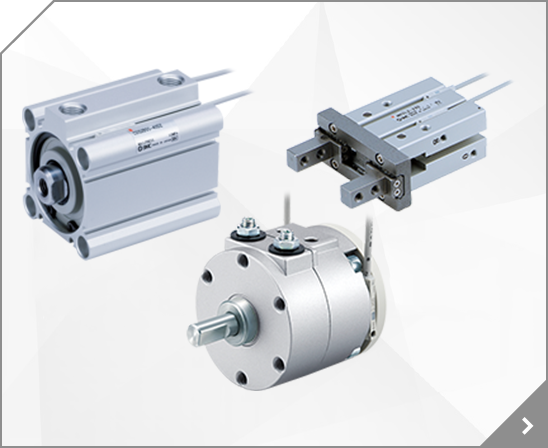


 Cylinder with Lock Series MNB
 Series Variations Applicable auto switch models Standard variations Lock system Standard stroke (mm) Bore size (mm) Solid state switch Reed switch Type Model Action Series Built-in auto switch magnet With rod boot Spring lock Grommet Grommet Mounting 3 wire 3 wire 2 wire D-F59 D-F59W D-J59W D-F5P D-F5PW D-F5BAL (2 color indicator) (2 color indicator) 2 wire 4 wire 3 wire D-J59 D-F59F D-F5NTL
BBA1: D-A5/A6/F5/J5 types *"D-F5BAL" switch is set on the cylinder with the screws above when shipped. When a switch only is shipped, "BBA1" screws are attached.
BBA1: D-A5/A6/F5/J5 types *"D-F5BAL" switch is set on the cylinder with the screws above when shipped. When a switch only is shipped, "BBA1" screws are attached.
The button is to increase and the button is to decrease the set value. 2 B D D Press the button continuously to keep increasing the set value. Connecting/Disconnecting When mounting the connector, insert it straight into the socket, holding the lever and connector body, and push the connector until the lever hooks into the housing, and locks.
Bracket A (Model: ZS-24-A) Bracket D (Model: ZS-24-D) Bottom piping ... Bracket B (Model: ZS-35-A) Hysteresis H_1 WARNING indicates a hazard with a medium level of risk which, if not avoided, could result in death or serious injury. Pressure [Pa] Warning: To set each of these functions, refer to the SMC website (URL http://www.smcworld.com) for more detailed information, or contact SMC.
M3 x 8L Panel 48 conversion adapter (Model: ZS-26-D) Default setting The default setting is as follows. If no problem is caused by this setting, keep these settings. [F 1] Setting of OUT1 [Measurement mode] Detects the pressure after power is supplied, and indicates the display and switch operating status.
D Key-lock function This function prevents operation errors such as accidentally changing setting values. E Zero-clear function This function clears and resets the zero value on the display of measured pressure.
Used as switch output device (ZS-33-D(M)) To obtain the operation manual about this product and control unit, please refer to the SMC website (URL https://www.smcworld.com) or contact SMC directly. [dt1] Delay time setting [0.00] 0.00 second Flow adjustment valve Orifice mechanism to adjust the flow.
This is a legacy product, and replaced byAL60-F10-8R-D AL MASS PRO. LUBRICATOR. AIRLINE EQUIPMENT. AL MASS PRO 1" MODULAR (PT). 1.62039 lb. HA.
This is a legacy product, and replaced byAL60-F10-D AL MASS PRO. LUBRICATOR. AIRLINE EQUIPMENT. AL MASS PRO 1" MODULAR (PT). 2.96775 lb. HA.
This is a legacy product, and replaced byAL60-F10-D AL MASS PRO. LUBRICATOR. AIRLINE EQUIPMENT. AL MASS PRO 1" MODULAR (PT). 2.62034 lb. HA.
This is a legacy product, and replaced byAW60-F10-D AW MASS PRO. FILTER REGULATOR. AIRLINE EQUIPMENT. AW MASS PRO 1" MODULAR (PT). 4.11528 lb. HA.
[F10] [ SUb] Sub screen display setting Used as IO-Link device [ dEF] Standard (fluid temp. displayed) : When a temperature sensor is connected. No. Name Lead wire colour Function Refer to the SMC website (URL https://www.smcworld.com) for more detailed information about product troubleshooting.
. : One arbitrary display mode can be added to the sub display by setting the [F10] sub display setting. If the sub display is switched during the arbitrary display setting, the display will be returned to the arbitrary display 30 seconds later.
. *: After 30 seconds, it will automatically reset to the display selected in [F10]. Bracket mounting (PF3W704/720/740) Mount the product (with bracket) using the mounting screws supplied (M4 x 4 pcs.). For models with flow adjustment valve attached, fix using 8 mounting screws. Bracket thickness is approx. 1.5 mm.
Excessive accumulated flow [F10] Selection of sub screen Display of set value Do not disassemble, modify (including changing the printed circuit board) or repair. An injury or failure can result. In measurement mode, when the button is pressed for 2 seconds or longer, [F 0] is displayed.
Display of sub screen In measurement mode, the display of the sub screen can be temporarily changed by pressing the UP or DOWN buttons. : After 30 seconds, it will automatically reset to the display selected in [F10]. Temperature sensor failure The temperature sensor is damaged. IO-Link Master and product version are not matched. Mismatch because master version is 1.0.
Caution: [F96] Number of pressurizing errors std (Standard) [F10] Sub display setting [Simple setting mode] Select the set value, hysteresis and delay time. [Function selection mode] Change the function settings. [Other Settings] Zero-clear function Key-lock function [3 step setting mode] Set either of set value or hysteresis.
Description F80 F10 [LEvEL] Level meter [ ON] Normal operation 2 1 DC(+) 2 To obtain the operation manual about this product and control unit, please refer to the SMC website (URL http://www.smcworld.com) or contact SMC directly.
Switch Point Setting F10 SUb Selects the mode and the display shown on the Sub display, or increases the switch point. UP button ( button) Safety Instructions Zero cut-off setting F14 ISA3-F: [0.0]%, ISA3-G: [6.0]%, ISA3-H: [10.0]% Cut Press this button to change the mode and to set the switch point.